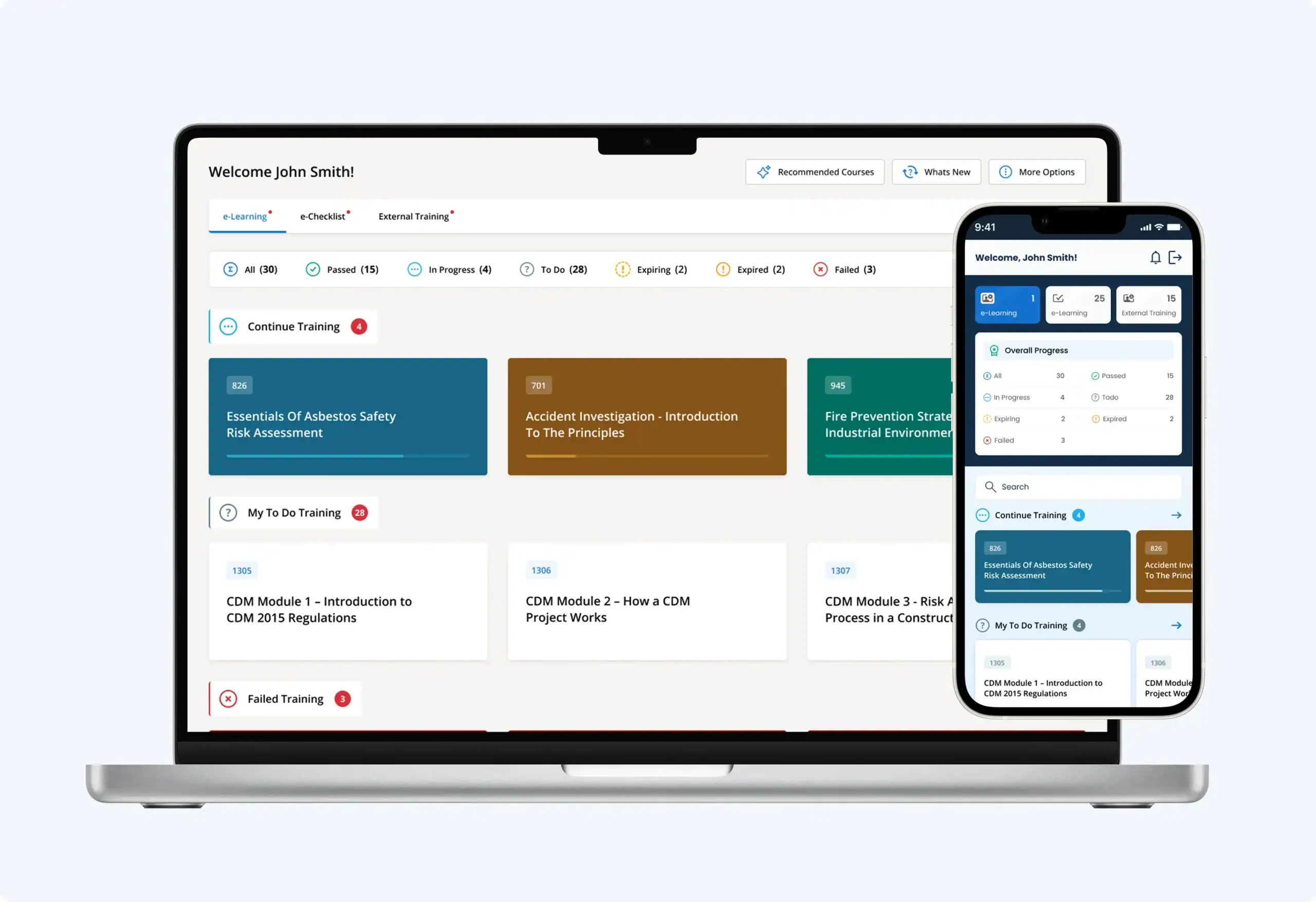
The Home Page is the first screen users see when they log in to Human Focus, and it now does far more to help them get straight to what matters.
The updated Home Page brings training status, assigned courses and key actions together in a focused, personalised view. Rather than moving between different areas of the system to work out what needs doing, users can see where they stand and act on it from one place.
The Human Focus app for iOS and Android has been updated with a redesigned dashboard built on the same principle.
The most significant change is not where things sit on the screen. It is that the system now brings the relevant information together for the user.
Previously, users could access this information across the relevant areas of the platform. The updated Home Page now brings the most important information together, reducing the need to move between different areas to understand what needs attention.
As soon as someone logs in, Human Focus surfaces what requires action – training in progress, courses not yet started, failed training, and records approaching or past their expiry date – grouped by status and activity type. Sections such as Continue Training and Failed Training appear only when there is something in them, so the page reflects that user’s actual position rather than a fixed template.
The Home Page is organised into three areas – e-Learning, e-Checklist and External Training – displayed according to the modules enabled for the organisation and the user’s permissions.
Each gives an at-a-glance overview of that area: a status summary showing how many records sit in each state, followed by the records themselves grouped by what needs attention. e-Learning covers courses in progress, outstanding, failed, expiring and expired. e-Checklist covers checklist folders in progress, due, and available to complete at any time, along with assigned actions. External Training covers training completed elsewhere, including records approaching or past their expiry date.
Because all three sit within the same Home Page, users can see their e-Learning, checklist and external training activity without opening separate areas of the system.
The Home Page is designed not just to show status, but to help users take the next action. A course in progress can be resumed from where it was left, or previewed without resuming from saved progress. A failed course can be reattempted. Assigned training can be started directly. An external training record approaching expiry opens the upload window from the Home Page itself, so the record can be updated without navigating elsewhere.
Quick-action buttons in the header link to the latest system updates and a short guide to taking a course, with further options available depending on permissions. The left-hand navigation menu has also been refreshed with a cleaner, single-colour icon set.
The redesigned app dashboard brings the same task-focused principle to mobile: the same three areas, with corresponding status summaries and grouped records adapted for a smaller screen.
For frontline and mobile workers, this brings the information they need to the forefront, making it quicker to check what is outstanding, start training or upload an external training record while on the move.
The update also brings improved navigation and usability across the app, along with stability improvements and bug fixes. It is available now from the iOS App Store and the Google Play Store, and will not impact customers currently using the older version, which will continue to work normally until they choose to update.
The result is a system that tells users where they stand rather than waiting to be asked. Assigned, outstanding and expiring training is visible at login, grouped by status, and actionable from the same screen – whether that screen is a desktop browser or a phone on site.
For learners, that means less time working out what is required and fewer deadlines missed. For organisations, it provides a clearer way for users to understand and act on their own training requirements, helping them stay on top of outstanding and time-sensitive activities.
Our support articles walk through these updates in more detail: