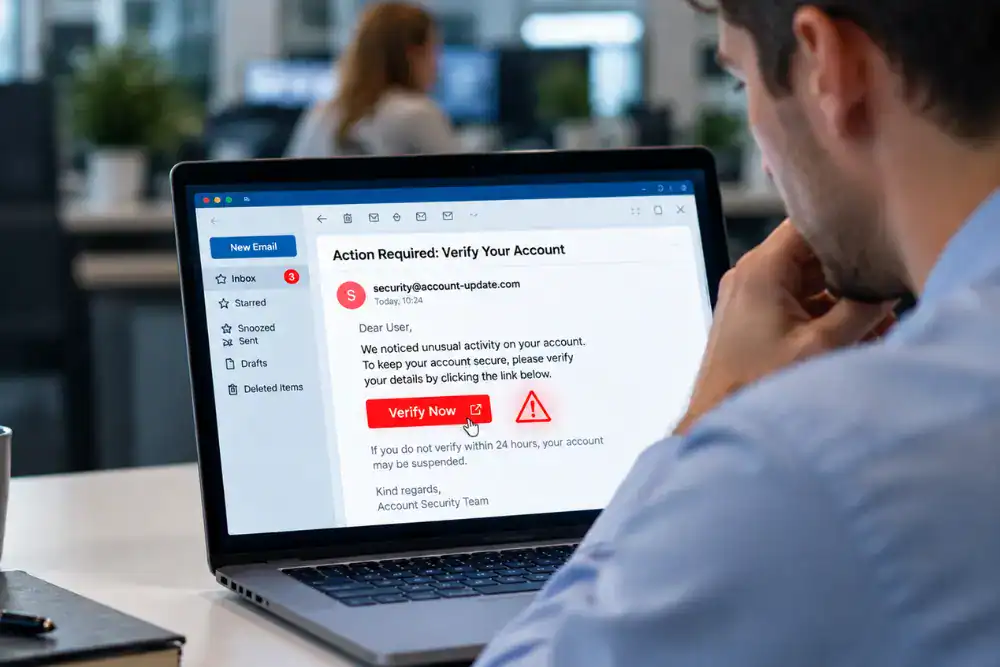
In short, phishing is a scam in which criminals impersonate a trusted person or organisation to persuade someone to take an unsafe action. A phishing email may ask the recipient to follow a link, open an attachment, enter login details, disclose information, reply to a fraudulent request or authorise a payment (NCSC, 2022a).
Phishing is a form of social engineering because it works by influencing a decision. The message may appear to come from a colleague, senior manager, supplier, bank, delivery company or familiar workplace system. Text-message phishing is often called smishing and voice phishing is known as vishing, but this article focuses on email because it remains central to workplace phishing.
Phishing remains common across UK businesses. In the Cyber Security Breaches Survey 2025/2026, 38% of UK businesses reported phishing attacks in the previous 12 months, making phishing the most prevalent type of breach or attack identified by businesses (DSIT and Home Office, 2026).
A phishing email is designed to make a requested action feel legitimate. It normally presents a reason to act, reduces the time or attention given to checking and directs the recipient towards a link, attachment, reply, login page or transaction.
Some emails are sent widely in the hope that a small number of people respond. Others are tailored to a particular organisation or person. This more targeted approach is known as spear phishing. Information about a role, supplier, project or manager can make the message fit the recipient’s normal work and therefore appear more credible.
Phishing emails may use accurate spelling and polished design. Criminals may use familiar branding, convincing language and information gathered from public sources. Authority, urgency, curiosity and emotion can all compress decision time. A request also becomes harder to challenge when it resembles a real task that arrives during a busy working day (NCSC, 2022b).
Phishing is one of several common cyber security threats. For an employee facing a suspicious email, the practical task is to recognise the pressure to act and check whether the request is expected and follows the organisation’s normal process. If the recipient acts without checking, the attack may lead to stolen credentials, disclosed information, transferred money or malicious software, although not every click or reply causes a breach (NCSC, 2024).
The safer response is therefore based on the request and the process, not on proving the attacker’s method. If the action would expose access, information or money, the recipient needs a trusted way to check it before proceeding.
There is no single appearance that proves an email is fraudulent. Sender details, links, attachments and wording all matter, but workplace context often provides the stronger warning. The key question is whether the request makes sense within the real task, relationship and process.
An email claims that a work account will be suspended unless the recipient signs in immediately. The branding looks familiar, but the message arrives without any expected system notification and sends the user to an unfamiliar address.
The safe response is to avoid the link and check the account through the organisation’s normal portal or another trusted route. A legitimate-looking logo does not confirm that the destination is genuine.
A message appears to come from a colleague or supplier and asks the recipient to open a document, enable content or review an attachment. The name may be familiar, but there is no preceding conversation or task that explains why the file has arrived.
The recipient should verify the request using a known contact method or established file-sharing system. Replying within the same email thread may simply return the message to the attacker.
A supplier appears to announce new bank details just before a payment is due, or a senior manager requests an urgent transfer outside the normal approval route. The request is plausible because it fits the work, but it changes a high-impact process and discourages normal checks.
Independent confirmation through an approved supplier record or known finance contact is essential. This type of request may also form part of digital fraud in the workplace, so the wider payment controls must remain in place.
The email uses authority, secrecy or urgency to request information, gift cards, credentials or an unusual action. A display name can be copied and a message can be well written, so familiarity alone is not enough.
The recipient should compare the request with the person’s normal way of working and verify it through a known internal directory or another established channel. Seniority should never remove the need for an agreed check.
A message says that a delivery has failed, a subscription is ending or a service requires immediate action. It may contain a button, attachment or QR code that leads away from the service the organisation normally uses.
The safe route is to access the service through its usual app or website, not through the email. QR codes in messages deserve the same caution as links because they can direct a phone to a fraudulent site.
Polished wording does not prove that a message is genuine. Equally, one unusual detail does not prove that it is malicious. A warning sign should trigger a pause, an independent check and a report rather than a private attempt to reach certainty.
Employees do not need to diagnose a message before raising it. If a request feels unexpected, changes a normal process or creates pressure to act, use three steps.
- Stop before acting. Do not click the link, open the attachment, scan the QR code, reply or carry out the requested action while the message is being checked.
- Verify through a trusted route. Use a known internal directory, an official website, an established account or the organisation’s normal approval process. Do not use a phone number, email address or link supplied in the suspicious message to verify that same message.
- Report the concern. Use the organisation’s approved route, such as a report button, service desk or security contact. Reporting uncertainty is safer than guessing, and it may alert the organisation to similar messages sent to other people.
Verification should confirm both the identity and the request. A colleague may genuinely have sent a message while using an unusual channel, but a real name does not make an unexpected payment, login or disclosure request safe. The established process still applies.
The NCSC also asks people to forward suspicious emails to report@phishing.gov.uk, even when they are not certain that the message is a scam (NCSC, 2022c). The NCSC forwarding service is an additional route and does not replace the internal process that allows an employer to investigate accounts, devices, payments and related messages.
Stop further interaction and report what happened immediately through the organisation’s incident route or IT and security contact. A prompt factual report is useful whether the person clicked a link, opened an attachment, replied, entered login details, disclosed information or started a payment.
The correct technical response depends on the device, account and event. Employees should follow the instructions of the responsible team rather than deleting evidence, running tools or resetting systems on their own. If the incident occurred on a work laptop or phone, NCSC guidance is to contact the IT department (NCSC, 2022d).
If a password may have been disclosed, say which account was involved and whether the same password was used elsewhere. The responsible team can then secure the account and direct any changes. Wider password security controls remain important, but they should not delay the immediate report.
If money may have been sent or payment details changed, notify the approved finance and security contacts at once. Fast reporting can give the organisation a better chance to limit harm. It should be treated as the correct response, not as an admission of failure.
Phishing training should give employees a shared way to recognise suspicious requests and respond to them. Its practical aim is a more consistent response when an email asks someone to do something unusual, sensitive or difficult to reverse, rather than perfect detection or course completion alone.
Useful phishing training should enable employees to:
- Explain how phishing messages imitate trusted people, organisations and workplace systems.
- Recognise requests that create urgency, use authority or depart from normal working processes.
- Check sender details, links, attachments and QR codes without interacting with them unnecessarily.
- Verify unusual or high-impact requests through an independent route and the agreed process.
- Use the correct reporting route when a message is suspicious or uncertain.
- Report quickly and accurately after an accidental click, reply, disclosure or payment action.
The examples should reflect real roles. A finance employee may need to challenge altered payment details. A customer service colleague may receive large volumes of unsolicited attachments. An administrator may see account-reset messages, while a manager may be impersonated in requests sent to others. Employees in each role still need to stop, verify and report, although the situations differ.
Employees should also know the organisation’s local expectations before a suspicious email arrives. Training can show which route to use, what information to include and when to involve finance, IT, security or a manager without asking the employee to make the technical decision alone.
Training should also challenge simplistic rules. Poor spelling, an unfamiliar address or an obvious design error can be useful warnings, but their absence does not make an email safe. Employees need to compare the request with expected work, established contacts and normal approval routes.
No training package can teach people to identify every phishing attempt. The NCSC warns that expecting staff to inspect every email in depth is unrealistic because opening messages and following legitimate links are part of normal work (NCSC, 2024). Training should therefore develop recognition, verification and reporting while the organisation reduces the number of attacks that reach people and limits what can happen when one gets through.
Employee awareness is one layer of phishing defence. The NCSC recommends a combination of technology, processes and people-based measures because relying on individual detection leaves one decision carrying too much weight (NCSC, 2024).
Organisations should make secure action practical. Making secure action practical requires a quick reporting route, a defined method for verifying sensitive requests and controls that prevent unusual payment, account and information requests from bypassing normal processes. Filtering, anti-spoofing measures, well-configured devices and multi-factor authentication can add protection, but none removes the need to prepare for incidents.
Normal processes should also be easy to recognise. Staff, suppliers and customers are better placed to challenge a fraudulent request when they know which channels the organisation uses and which requests will always require an independent check.
The response to reports also matters. People need to be able to ask for support, raise uncertainty and disclose mistakes without fearing an automatic reprimand. NCSC cyber security culture guidance recommends accessible reporting routes, fair treatment and incident investigation focused on learning rather than blame (NCSC, 2025).
Accessible reporting routes, fair treatment and clear incident processes help employees stop, verify and report consistently.
Phishing is designed to make an unsafe request feel familiar, urgent or routine. Employees can respond to a suspicious email without first proving that it is fraudulent: stop, verify the request through a trusted route and report both concerns and mistakes.
Human Focus Cyber Security Awareness Training is a CPD-certified, fully online course that covers phishing within wider cyber security awareness. It supports a consistent understanding of how to recognise and respond to suspicious messages, alongside the organisation’s technical controls, working processes and incident response arrangements.